
Business Solutions Built Around How You Actually Work
From one automated process to a complete custom system, we build around your organization -- not the other way around.
Schedule a Free ConsultationWhat We Can Build for You
You don't need to know the technology -- just the problem you're trying to solve.

Manage Customers & Clients
Keep every customer's history, documents, and communication in one place instead of scattered across email and spreadsheets.
• Every customer's contact info, past communications, and documents live in one searchable record instead of scattered emails
• A law firm or professional services team can track every case from intake to close -- deadlines, notes, and documents in one file
• A healthcare office, church, or nonprofit can track patient, member, or donor history and giving records automatically
• Sales leads move through a pipeline automatically, so nothing falls through the cracks between "interested" and "signed"
• A customer who hasn't been contacted in 30 days automatically triggers a follow-up reminder for their rep
• A customer's birthday or anniversary auto-sends a personalized discount code, no one has to remember
• A new lead submitted through your website instantly texts the right salesperson instead of sitting in a shared inbox
• When a customer calls in, their full history pulls up automatically before your team even answers

Manage Projects & Jobs
Track every project from the first estimate through completion, with clear assignments and status visibility.
• Every job moves through clear stages -- estimate, scheduled, in progress, complete -- visible to your whole team
• Each task has an owner and a deadline, so it's never unclear whose turn it is to act
• Staff, equipment, and vehicles get scheduled and assigned without double-booking
• Field crews document job progress from a phone, and it's visible back at the office instantly
• A field crew's phone photo automatically files itself into the correct project folder
• A missed deadline automatically escalates to a manager instead of quietly sitting
• Bad weather in the forecast automatically flags outdoor jobs that need to be rescheduled
• Budget and hours logged against a job update automatically as work happens
• Clients get an automatic status updated email at each project milestone
• An email with project files or plans automatically saves the attachments straight into the right job folder
Manage Inventory & Operations
Track inventory, purchase orders, and equipment in real time, so everyone works from the same accurate numbers.
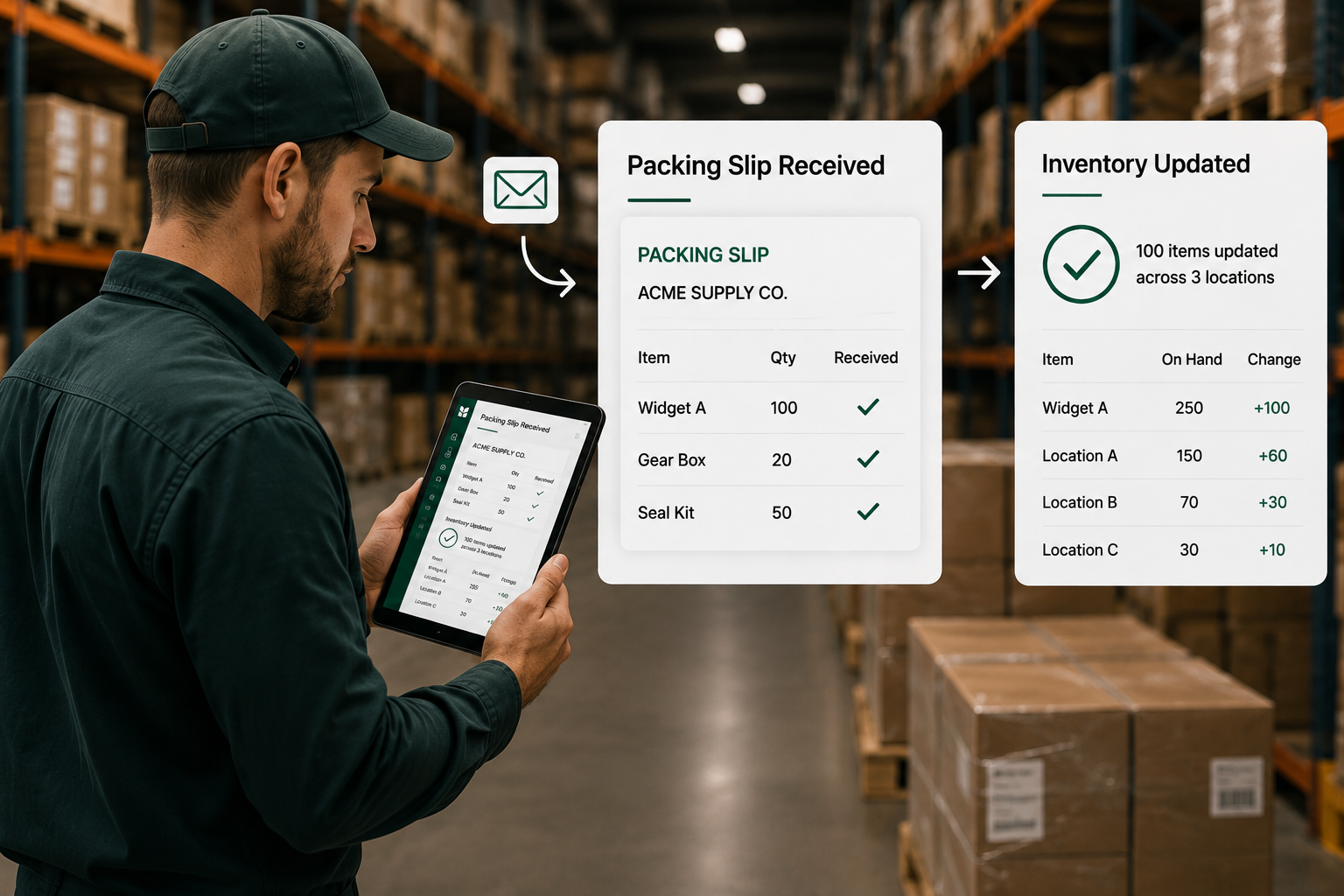
• Inventory counts update automatically as items come in and go out, instead of a spreadsheet someone updates by hand
• Vendors and purchase orders are tracked in one place, so no one's digging through email for a PO number
• Orders move automatically from placed to fulfilled to shipped, with status visible the whole way
• A vendor's emailed packing slip automatically updates received inventory, no manual data entry
• Production runs, quality checks, and finished goods are tracked stage by stage on the manufacturing floor
• Equipment maintenance schedules and inspection histories are tracked automatically, not on a clipboard
• A barcode scan on a phone instantly updates inventory counts company-wide
• Falling below a reorder threshold automatically emails a purchase order to your vendor
•A received shipment automatically updates the status of the order or job it belongs to
• Low-stock items automatically flag on a dashboard before they become a problem

Automate Repetitive Work
Keep approvals, reminders, and routine follow-ups moving on their own, without anyone babysitting the process.
• A purchase request, expense or contract routes automatically to the right approver
• Reminders and escalations fire automatically instead of relying on someone to remember
• A document that needs review moves to the next step automatically once approved
• A new employee's onboarding checklist runs itself instead of living in someone's head
• Even old software with no modern connection option can be automated like a person operating it
• A signed contract automatically creates the new client's file and sends a welcome packet
• A new listing or product automatically posts itself to Facebook and Instagram
• An employee's last day automatically triggers the full offboarding checklist
• An approval that sits untouched for 48 hours automatically reminds the approver
• An email with a signed document automatically pulls out the attachment, files it, and notifies the right person

Manage Documents & Records
Keep every document centralized and version-controlled, so no one's ever guessing which copy is current.
• Every document lives in one searchable library instead of scattered folders
• Version control means everyone's always looking at the current file
• Documents route automatically for review, then file themselves once approved
• Licenses and certifications are tracked with automatic renewal reminders
• Scanned invoices and receipts have their data pulled out automatically, no typing
• A document needing review routes itself to the right approver automatically
• Expiring contracts automatically flags 60 days before renewal is due
• Old, outdated versions get automatically archived instead of cluttering the current folder
• An emailed contract, invoice, or ID automatically saves itself into the correct folder, correctly named, without anyone opening the email
• A newly uploaded document can automatically notify the right team, so nothing important sits unnoticed
Manage Requests, Cases, & Services
Take a request from submission through resolution, with automatic routing and visibility for everyone involved.
• Paper forms and email requests get replaced with a digital form that routes itself
• A new request is automatically assigned to the right person based on type
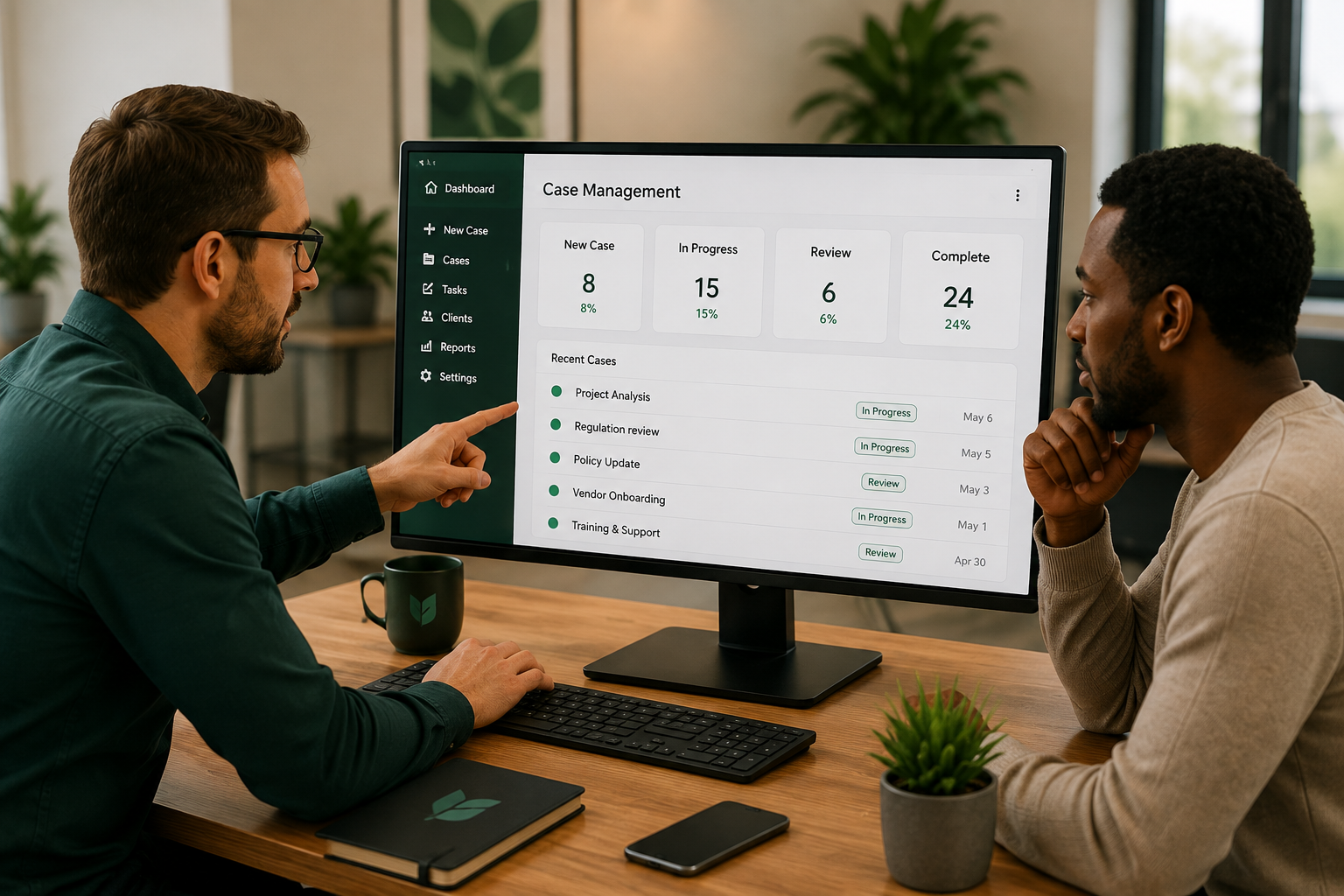
• Every case or ticket is trackable from submission through resolution
• Everyone involved can see exactly where things stand, no phone call required
• An AI-powered chatbot instantly answers common questions any time of day
• A new request automatically texts the person it's assigned to
• A customer automatically receives a text update as their case moves forward
• A request that's been open too long automatically escalates to a supervisor
• A request that comes by email, attachment and all, automatically creates a case and files the attachment against it.
• Once a case closes, a short survey can go out automatically, giving you feedback

Track Performance
& Make Better Decisions
See what's actually happening across your business, updated automatically instead of compiled by hand.
• Data from multiple systems combines automatically into a single dashboard
• Key numbers like workload and sales update in real time, not once a month
• Financial and operational data sit side by side, connected to your accounting software
• Trends over time are visible at a glance instead of buried across old spreadsheets
• A dashboard updates in real time the moment an order comes in
• A performance summary automatically emails itself to leadership every Monday
• A shop-floor dashboard updates live as production happens
• A red/yellow/green status indicator flags a project falling behind schedule
• A weekly report generates and files itself automatically, with every past report archived and searchable

Client & Customer
Self-Service Portals
Give clients a place to help themselves, any time, without needed to reach a specific person.
• Clients log into a secure portal to submit requests and check statuses themselves
• Status updates happen automatically, so clients don't have to call and ask
• Documents can be signed right inside the portal, no printer or scanning needed
• The portal syncs directly with your internal system, no double data entry
• A text or email fires automatically the instant a client's status changes
• Clients can view their full request or project history in one place
• Login can use existing Microsoft or Google credentials, no new password to remember
• Clients can track multiple open requests from a single dashboard view
• A document a client emails automatically appears in their portal record, no manual upload step

Build a Complete
Custom Business System
When a spreadsheet or manual workaround stops being enough, we build one complete system to replace it.
• Every capability mentioned on this page works together in one connected system instead of separate tools
• The system is built around your organization's actual workflow, not a generic template
• It connects to nearly everything you already use, from social media to your accounting software
• Customers, projects, inventory, and documents all live in one place instead of six different tools
• New employees learn one system instead of juggling five different logins
• Reporting pulls automatically from every part of the system, no manual stitching together
• The system can start with one process and expand over time without starting over
• Built on Microsoft's secure infrastructure, meeting the same standards as your other Microsoft tools
• Incoming emails, attachments, and requests all route and file themselves automatically across the entire connected system
The Right Solution Starts With the Right Problem
Every organization works differently, which means there's no one-size-fits-all answer to improving operations. Sometimes the right solution is a simple automation that saves a few minutes every day. Other times, it's a custom application that becomes central to how your team works.
Our goal isn't to recommend the biggest solution — it's to recommend the right one. By understanding how your organization operates today, we help identify practical improvements that make work easier and more efficient, without investing in more technology than the problem actually calls for.
Ready to Build Something Better?
Whether you're looking to automate repetitive work, streamline operations, or get more value from the Microsoft tools you already own, we're here to help. Let's start with a conversation about your business—not a sales pitch.
Schedule a Free Consultation